
Filtering Tasks
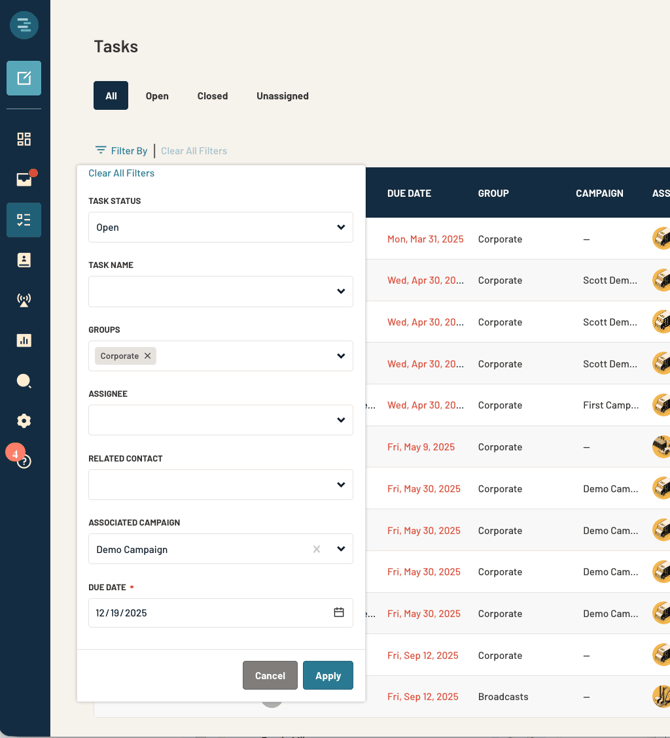
Filtering allows users to narrow down Tasks to a precise working set, which is required in order to take bulk actions.
Available Filters Include:
- Task Status
- Task Name
- Groups
- Assignee
- Related Contact
- Associated Campaign
- Due Date
Users may apply any combination of filters. For example, “Tasks assigned to Jamie, due July 21, 2026, and marked Complete.”
Bulk Actions for Tasks
Bulk actions allow Admins and Managers to update large sets of tasks at once, based on applied filters.
When Bulk Actions Appear
Bulk action bar displays only when one or more filters are applied, excluding status-only filters. Status-only filtering is exempt because bulk-updating all open tasks is not a supported workflow.
Available Bulk Actions
The following bulk actions are available on the filtered set:
Delete Tasks
- This action requires confirmation and cannot be undone once confirmed.
Assign or Reassign Tasks
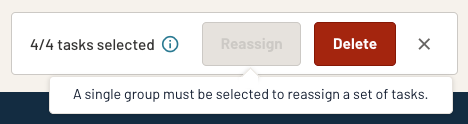
- Enabled only when exactly one Group is selected.
- This helps ensure that Tasks are assigned to users based on the group designation of the Task.
- Update Due Date
Important Notes
- Bulk actions never modify Closed/Completed tasks.
- If a filtered set contains only Closed tasks, UI will clarify that bulk actions cannot be applied
Permissions
- Admins & Managers: Can use all bulk actions.
- Members: Cannot access bulk actions.
Task Details Flyout
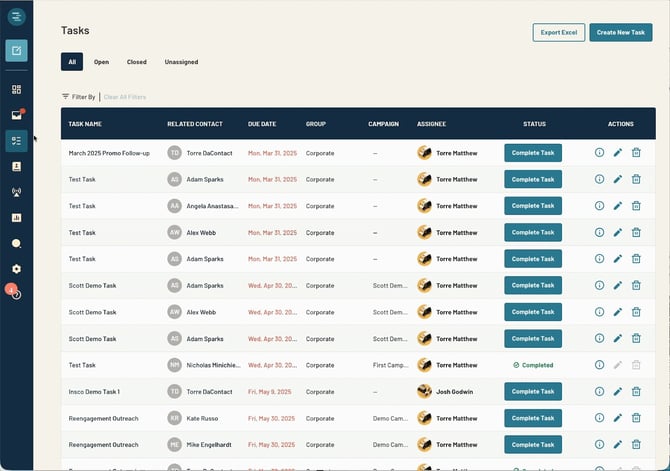
The Task Details flyout has been redesigned to provide clearer information and faster access to related actions.
Other Enhancements
- Reordered content for better readability.
- Status now displays with color + button style, not static text.
- Bottom action button now adapts based on task status:
- When a task is still Open the main action is to "Complete Task"
- When a task is Closed the main action is to “View Thread”
- Task Name no longer opens the flyout—the flyout is opened via the task row action area.
- Tasks associated with a campaign include a Campaign link inside the Task Details flyout.
- Admins and Managers can open the Campaign page; Members will not see or access campaign links.