
- What is Needs Follow-up?
- When Does a Quote Need Follow-Up?
- Where Can I Find Quotes That Need Follow-Up?
- How Do I Follow Up on a Quote?
- Are Follow-Up Messages Sent Automatically?
- Can the verbiage be changed for Follow-Up Messages?
- What Happens to Older Quotes?
What is Needs Follow-up?
Needs Follow-up is an Order Automation feature that helps users identify Quotes that remain in a Pending status and may require additional follow-up with the customer.
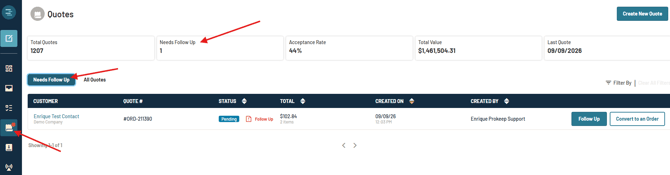
When Needs Follow-up is enabled, the Quotes page includes a dedicated Needs Follow Up tab and a Needs Follow Up indicator showing the number of Quotes currently requiring follow-up.
When Does a Quote Need Follow-Up?
A Quote is flagged as Needs Follow Up when it has remained in Pending status for more than 24 hours.
Prokeep checks approximately once every hour to determine whether a Quote meets the criteria for follow-up. Because of this, a Quote may not appear in the Needs Follow Up tab immediately after reaching the 24-hour threshold.
Needs Follow-up only applies to Quotes created after the feature has been enabled for the account.
NOTE: Quotes that were created before Needs Follow-up was enabled will not be retroactively flagged, even if they have been in Pending status for more than 24 hours.
Where Can I Find Quotes That Need Follow-Up?
To view Quotes that require follow-up:
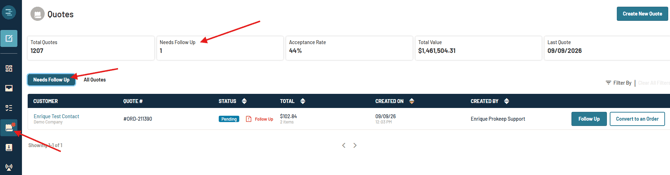
- Navigate to Quote History from the side menu in Prokeep.
- Select the Needs Follow Up tab.
The Needs Follow Up indicator displays the number of Quotes currently requiring follow-up.
How Do I Follow Up on a Quote?
To follow up on a Quote:
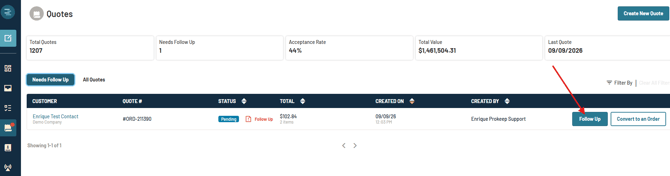
- Navigate to the Needs Follow Up tab.
- Locate the Quote you would like to follow up on.
- Click the Follow Up button as shown.
- Review the follow-up message.
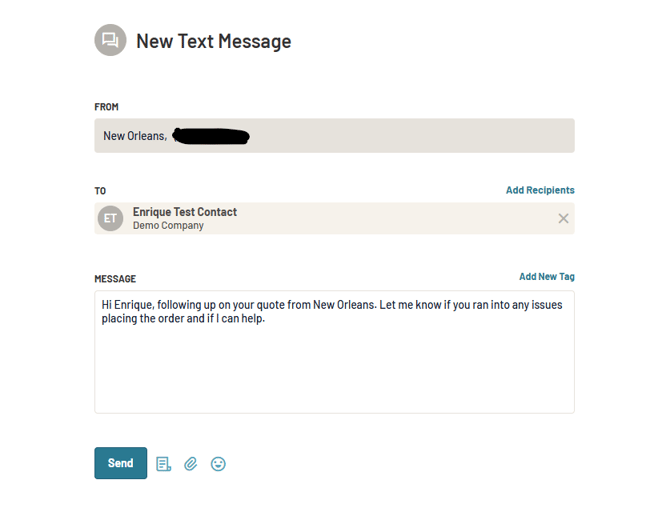
- Then click on the “Send” to send the message to the customer.
Are Follow-Up Messages Sent Automatically?
No. Needs Follow-up does not automatically send a message to the customer.
The feature identifies Quotes that require follow-up, but a user must manually select Follow Up and send the message.
Can the verbiage be changed for Follow-Up Messages?
At this time the verbiage cannot be changed.
What Happens to Older Quotes?
Quotes that remain in Draft or Pending status for more than 30 days are automatically moved to Archived. Archived Quotes are read-only but remain available in Prokeep for historical reference.